VoltaELECTRICAL ESTIMATING
Connector · Claude & ChatGPT

AI electrical estimating software, inside Claude and ChatGPT

Connect VOLTA to the AI assistant you already use. Ask it to check your estimate against the drawings, change quantities when you agree, and make the quote — with VOLTA's own estimator doing every price.

Included with VOLTA · free 30-day trial, then $9.99 CAD/mo.
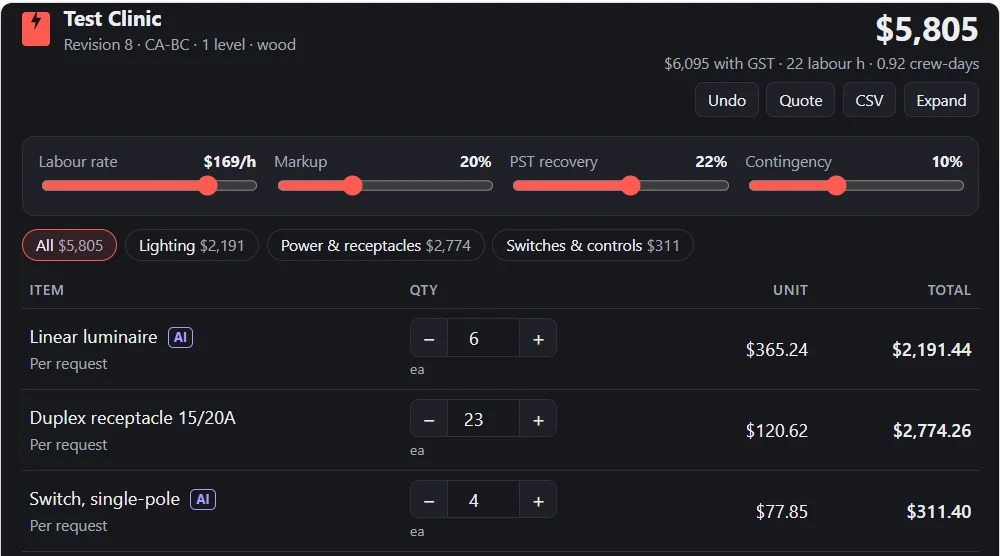
A VOLTA estimate open inside ChatGPT: Test Clinic, $5,805, with labour rate, markup, PST and contingency sliders and three priced line items
The VOLTA estimate view inside ChatGPT (sample project).
What it does

Your estimate, in the chat

The assistant reads and explains. VOLTA does the numbers.

Check against your drawings

Share the drawings or specs in the chat. The assistant counts devices, cites the sheet and room for each count, and lists where your estimate differs.

Change quantities

It proposes each change — item, current quantity, new quantity, why — and applies it only after you agree.

Make the quote

All six quote layouts and three versions, with scope of work, terms and signatures, as a printable link.

Calculation report

The math behind every line — labour hours, rates, markup and tax — ready to read or send.

VOLTA's own pricing

The connector runs the same estimator as the website. The assistant never works out a total itself, so the chat and the app always agree.

History and undo

Every change keeps who made it and why. Changes the assistant applies are marked as set by AI, and one step undoes them.

Connect

Connect in two minutes

You need a VOLTA account — the free trial works. Use this address in either assistant:

Addresshttps://voltaelectric.ca/mcp

In Claude

  1. Open Customize → Connectors, click + Add, then Add custom connector.
  2. Name it VOLTA and paste the address above.
  3. Click Connect, then sign in with your VOLTA email and password.
  4. In a new chat, ask: "List my VOLTA projects."

In ChatGPT

  1. Go to chatgpt.com in your web browser (set it up there, not in the desktop app). Open Plugins, then Add → Add custom MCP server.
  2. Name it VOLTA, leave Server URL selected, paste the address above and keep OAuth. Tick I understand and want to continue.
  3. Click Create as a plugin, then sign in on VOLTA's page with your VOLTA account.
  4. In a new chat, type @ and pick VOLTA, then ask: "List my projects."

You sign in on VOLTA's own page. The assistant never sees your password. Menu names inside Claude and ChatGPT change from time to time.

Ask it like this

Things contractors ask

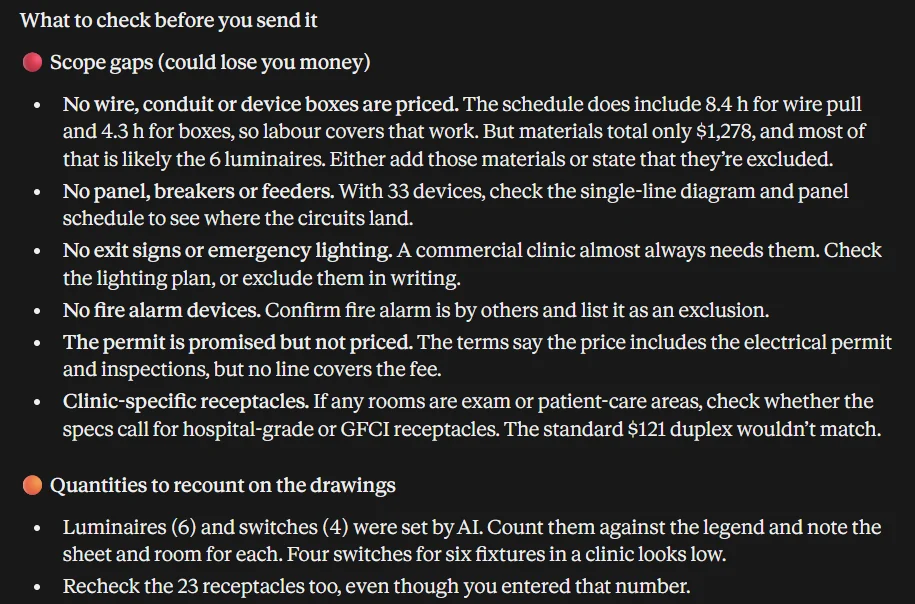
Review my estimate and tell me what to check before I send the quote. Don't change anything.A review with scope gaps, recounts and quote details

Here are the lighting plans. Count the fixtures by type and compare them with my estimate.Counts with the sheet and room for each

Add the Type LA luminaire from the fixture schedule: $185 material, 0.75 h each, quantity 24.A custom line priced by VOLTA

Make the quote in the proposal layout and give me the printable link.A client-ready quote, link valid for 7 days

Show me the calculation report and explain why labour is where it is.The math behind every line

Set contingency to 7% and markup to 18%, then tell me the new bid.Settings changed only when you ask

Claude's review of a VOLTA sample estimate: scope gaps such as unpriced wire and boxes, no panel work, no exit signs, an unpriced permit, and quantities to recount
Claude reviewing a VOLTA sample estimate. Nothing was changed.
You stay in control

AI proposes. You decide.

  • Nothing changes without your yes

    The assistant lists what it would change and why, then waits for you to agree.

  • Same estimate everywhere

    Your Project log and the assistant see the same projects. Change one in the chat and it is changed in the app; edit it in the app and the assistant sees the edit.

  • Your data

    Once you connect an assistant, the estimates in your Project log are kept on VOLTA's servers so it can open them. Drawings read in the VOLTA app still never leave your device. Privacy

Frequently asked

Can ChatGPT or Claude do electrical estimating?
On their own they can explain and count, but they guess at prices. Connected to VOLTA, they work on a real estimate: VOLTA's estimator does every price, total and quote, and the assistant reads drawings, finds gaps and proposes changes.
Does VOLTA work with Claude and ChatGPT?
Yes. VOLTA has a connector (an MCP server) at https://voltaelectric.ca/mcp. Add it as a custom connector in Claude, or in ChatGPT on chatgpt.com under Plugins → Add → Add custom MCP server, then sign in with your VOLTA account.
What does the connector cost?
It is included with VOLTA. You can use it during the 30-day free trial, then it is part of the $9.99 CAD/month plan. Your Claude or ChatGPT plan is separate and set by Anthropic or OpenAI.
Can the AI change my estimate without asking?
VOLTA tells the assistant to propose changes first and apply them only after you agree. Every change it applies is marked as set by AI, keeps the reason in the estimate's history, and can be undone.
Does the assistant read my drawings?
Only drawings you choose to share in the chat. It counts devices from them and cites the sheet and room for each count. Reading drawings automatically into a new estimate happens in the VOLTA app at voltaelectric.ca/app/, where drawings never leave your device.
Where is my data kept?
Estimates you open through an assistant, your shop settings and your company details are kept on VOLTA's servers (Netlify, which may store data outside Canada). What you type in the chat is handled under the assistant's own privacy terms.
What is an MCP connector?
MCP (Model Context Protocol) is the standard Claude, ChatGPT and other assistants use to connect to outside tools. The VOLTA connector gives the assistant VOLTA's own tools: open projects, set quantities, add custom lines, make quotes and reports.

Bring your next estimate to the chat. Included with VOLTA, free for 30 days.

Start free trialHow to connect

Related: PDF takeoff · panel schedules · what AI takeoff actually does · how to use VOLTA inside Claude and ChatGPT